Keyword match
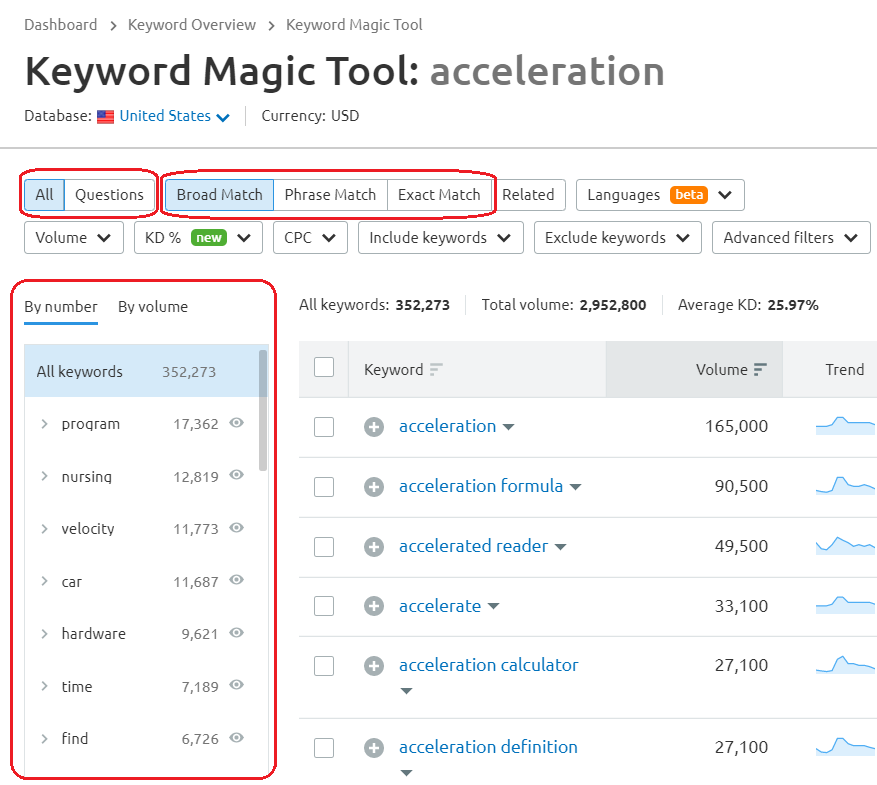
The Keyword Magic Tool in SEMrush: Broad Match option.
When you’re looking for keywords for your new calculators, the keyword match tool is the first one you should check. There are three options available:
Broad Match — Shows any variation of your keyword in any other phrase;
Phrase Match — Shows exact keywords in various orders; and
Exact Match — Shows exact keywords in exact order.
The first option returns the broadest results and is the recommended one. However, when there are too many keywords listed, you might want to use the other two (see the example below). Whichever method you use, you should sort the keywords list by volume because it is the most interesting metric.
Note
For example, if you want to find all ideas for calculators connected to the word “acceleration”, you can use Phrase Match and type in “acceleration calculator”. In that way, you won’t have to scroll down 5,000 keywords, but “only” 1,000.
On the left-hand side of the keyword match window, there is a list of all words present in the found keywords, sorted by the number of occurrences or volume. You can use this list, e.g., if you’re looking for some inspiration for calculator texts.
Tip
If you’re interested in question-based keywords for an FAQ section, consider changing option All, to Questions, next to the Broad Match button.