Internal links
For how to create links, please check out the Links section.
To improve the user’s experience and Google’s ranking of our website, you are expected to include a minimum of 4-5 links to our other calculators. These calculators should generally be of a similar topic to your current tool, but feel free to get creative with links if you see a possible connection (e.g., a link from area of a circle to pizza).
You can add external links to particular words or phrases within a sentence that provide a description of the tool. The following image serves as a guide:
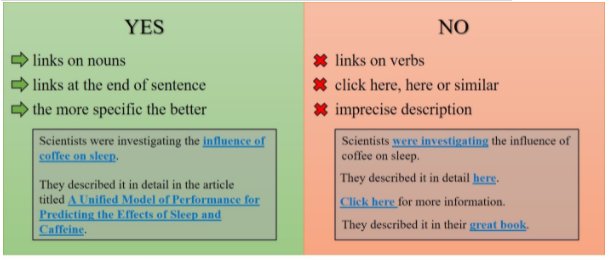
You can also explicitly state that the link is one of our tools, e.g., “if you want to know more, check out our circumference calculator”. In this case, always refer to the calculator as “our” or “Omni’s” or some similar way to let people know they’re staying on the site. The link should be on the title of the calculator, e.g. “circumference calculator” in this example.
Tip
You can also include a list of internal links as a “If you enjoyed this tool, you may also enjoy…” section.
You should also go back to at least three already published calculators and add a link to your new calculator after it has been published. This is to ensure users can find our new tool. You’ll be prompted to do this on Trello. You can find more about this in the Links from previous calculators section.