OmniGeneralTips
latest
  • Omni Calculator’s handbook for calculatorians©
    • Most useful links
    • Copy-paste stuff
    • AdminBB
    • Calculator page
    • Edit calculator
    • Writing texts
      • Edit calculator text
        • Title and SEO title
        • Simple editor and syntax highlight editor
        • Description
        • FAQ
        • Revisions
        • SEO Check
      • Calculator style guide
      • Text styling guide
      • FAQ guide
    • Keywords research
    • Trello
    • Slack
    • Grammarly
    • Mastermind
    • Monitoring the traffic
    • Marketing calculators
    • Projects in Omni
  • Welcome to Omni’s customJS primer for Calculatorians©
OmniGeneralTips
  • »
  • Omni Calculator’s handbook for calculatorians© »
  • Writing texts »
  • Edit calculator text »
  • Simple editor and syntax highlight editor »
  • Links
  • Edit on GitHub

Links

Here are some general DOs and DON’Ts when creating any link from your text.
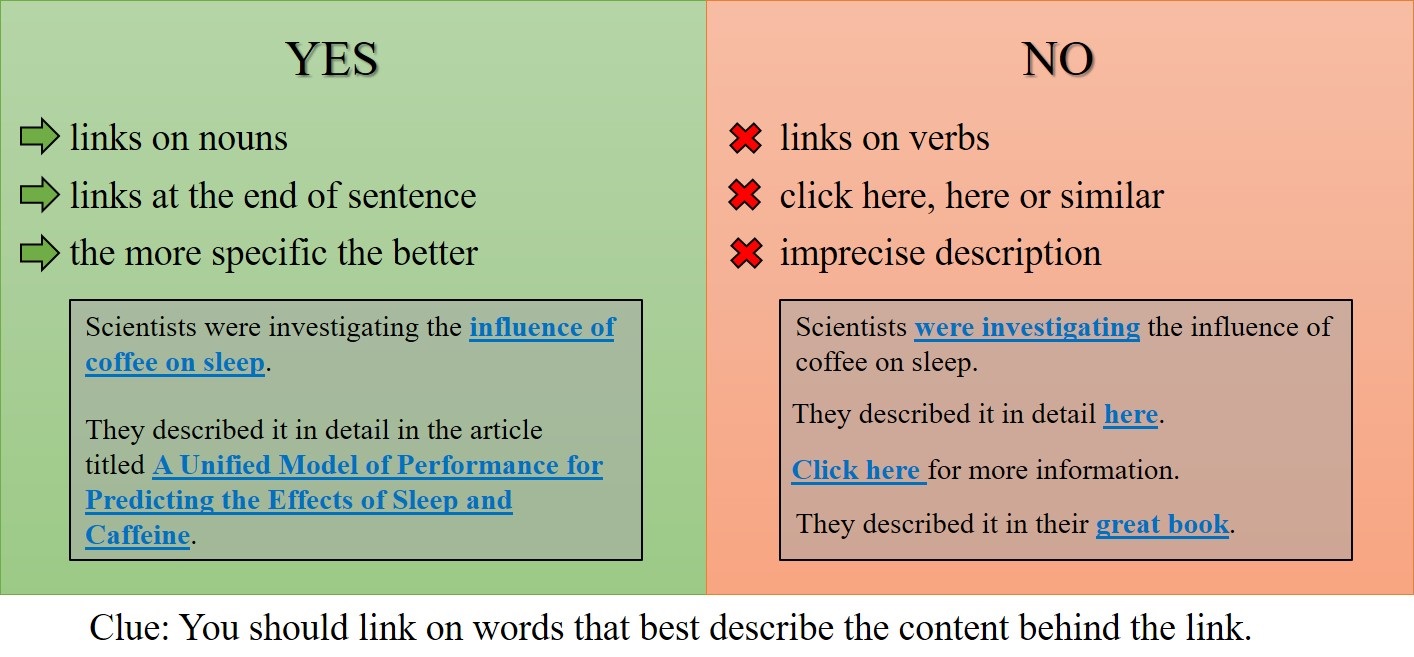
example of the SEO title being too long

For more tips on adding internal links, please visit the Internal Link section

Internal links — linking to other calculators

To link to another calculator, the easiest way is to use the Links tab. You can find out how to do that on the links tab page of this handbook.

You can add a link manually using the <portal> tag, like this:

  • <portal cid="xxx">link text</portal>

where xxx is the ID number of the calculator you wish to link to.

An example is:

  • <portal cid="630">sleep</portal>

Markdown

To create a link to an external website using Markdown syntax, use the following syntax:

  • [link text](http://www.example.com)

Next Previous

© Copyright 2021. Revision 8bf1d8d2.

Built with Sphinx using a theme provided by Read the Docs.