Tables
Tables can be embedded in the text using standard HTML table tags. Here, we will briefly the most important tags and look at a few examples.
Tip
If you want to use the table from another website, you don’t need to rewrite it - tools exists which can do it for you, e.g., https://codebeautify.org/csv-to-html-converter.
However, sometimes the formatting fails and copy & paste doesn’t work so nicely. Then, first copy the table to the spreadsheet and from there to the converter tool.
The most important tags:
<table> ... </table>— Creating table;<thead> ... </thead>— Group header content;<tbody> ... </tbody>— Group the body content;<tr> ... </tr>— Row of a table;<td> ... </td>— Cell of a table; and<th> ... </th>— Header cell of a table.
Formatting tags:
<i> ... </i>— Italics;<b> ... </b>— Bold;<sup> ... </sup>— Superscript text;<sub> ... </sub>— Subscript text;<small> ... </small>— Small text;<center> ... </center>— Center text; andDon’t use
<style>!
Tips:
Table is too big — Try resizing the font with
<small><table></table></small>Aligning the content of a table:
<table style="font-size: 15px; text-align:center">Center the contents of a cell:
<td><center></center></td>
Example
<table>
  <thead>
    <tr>
      <th><center>Temperature (<sup>o</sup>C)</center></th>
      <th><center>Pressure (kPa)</center></th>
    </tr>
  </thead>
  <tbody>
    <tr>
      <td><center>0</center></td>
      <td><center>0.6113</center></td>
    </tr>
    <tr>
      <td><center>20</center></td>
      <td><center>68</center></td>
    </tr>
  </tbody>
</table>
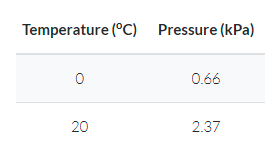
Here’s how the above HTML table is rendered.
Another example: Vapor Pressure of Water Calculator.
For more information on the style required for tables, please check out the Tables section in the Style Guide.