Videos
Note
While you can embed videos directly in your texts, this should generally only be done for marketing calculators, due to the large file sizes associated with the video on first page load. You can of course include a link to the video in your text.
You can embed YouTube videos using the following HTML code:
<video-embed src="https://www.youtube.com/embed/tpYnRwC1GaU"></video-embed>
Warning
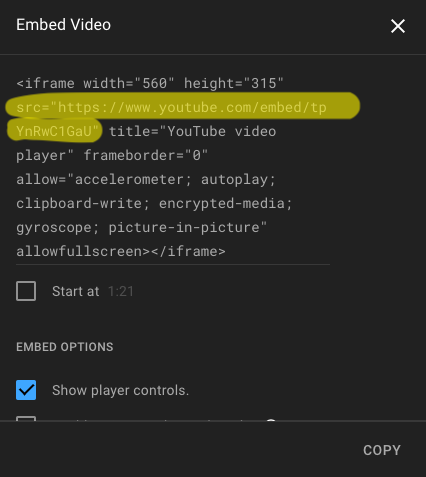
The link for embedding is different than the link to the video itself — click Share -> Embed under the video to get the link (in the form as shown above).
Here is what you see when you go to embed that video on YouTube. Highlighted in yellow is the code to use in the <video-embed> tag.
Tip
If you want the embedded video to appear in the middle of the text column, you can use the <center> tag:
<center>
  <video-embed src="https://www.youtube.com/embed/tpYnRwC1GaU"></video-embed>
</center>